


AI Tattoo Generator & Maker
0.00.00 Reviews
App Specs
- Version
- 1.0.6
- Updated On
- License
- Free
- Downloads
- 50,000+
- Developer
- GLOBAL SOFT .LTD
- Categories
- Art & Design
- Platform
- Android
Screenshots
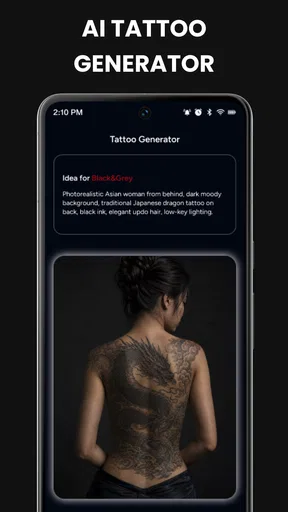
 Analysis by AppCompare
I approached AI Tattoo Generator & Maker as a planning tool rather than a replacement for a tattoo artist, and that distinction shaped my opinion from the start. Its main appeal is simple: it gives you a quick way to explore tattoo ideas, see how a concept might look on your body, and turn a promising design into something closer to a stencil. For anyone who has a vague image in mind but cannot explain it clearly, that can be genuinely useful.
The app sits in the Art & Design category and is developed by GLOBAL SOFT .LTD. It is free to use, aimed at Everyone, and has passed the early discovery stage with over 50K installs. The current version is 1.0.5, and it works on Android 8.0 or later. Those details make it accessible to a fairly broad range of phones, although the quality of the experience will still depend on your camera, screen, and how well you can describe the design you want.
What makes the tattoo workflow useful
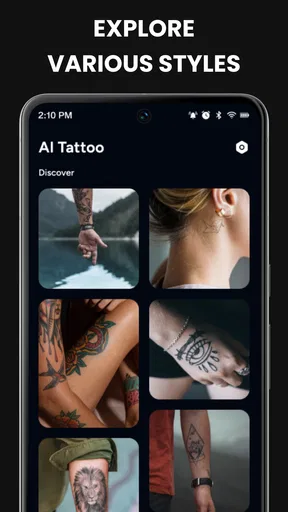
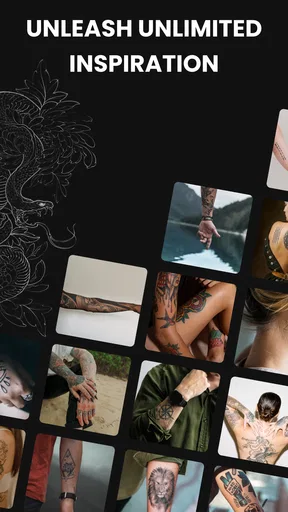
The strongest part of the app is the way it brings several early tattoo decisions into one place. Instead of searching image boards, saving unrelated references, opening a separate editing tool, and then trying to imagine the result on your skin, you can begin with an AI-generated concept and move toward a visual preview. That makes it especially helpful during the uncertain stage when you are comparing styles rather than ready to book an appointment.
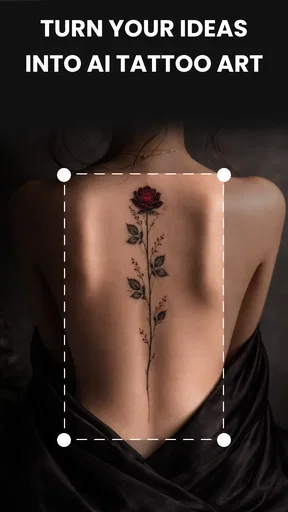
I found the AI approach most valuable when the starting idea was specific enough to guide it but open enough to allow interpretation. A phrase such as a delicate botanical symbol, a compact geometric animal, or a dark ornamental design gives the generator room to produce a direction. A request that combines too many precise elements can be less satisfying because the result may capture the mood without preserving every requested detail. I would treat each output as a sketch for discussion, not as a finished tattoo sheet.
That distinction matters because tattoos are not ordinary illustrations. A design that looks impressive on a phone can become muddy when reduced, stretched around an arm, or placed over a curved area. Fine lines, tiny lettering, narrow gaps, and crowded shading all need practical judgment. The app helps me decide what visual language I like, but it cannot replace an artist checking line weight, aging, placement, and the limitations of real skin.
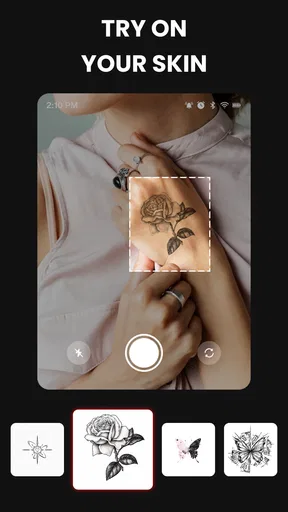
The AR try-on feature is another meaningful advantage. Seeing a design over a camera view is more informative than holding an image beside your arm and guessing. It can reveal that a placement feels too prominent, that a shape needs to rotate, or that a design that looked balanced on a blank screen feels awkward on the body. I would use this stage to compare locations and scale, not to make a final decision about how the tattoo will actually look after healing.
There is also a practical psychological benefit. Many people hesitate because they cannot picture themselves with a tattoo. A camera-based preview lowers that barrier and makes the conversation more concrete. It is easier to tell an artist, “I like this size and position, but I want the lines simpler,” than to describe an abstract idea from memory. In that sense, the app works well as a communication aid.
Worth Reading Before You Choose

EA SPORTS FC Mobile 26 Is a Bigger Football Game, but It Takes Time

Flipboard Shows What News Apps Must Do Beyond the Feed

Switching to Android Auto Means Rethinking Your Driving Routine

Google Calendar Makes a Crowded Week Easier to Manage

Ludo King Makes the Most of the Minutes Between Plans

Baby Panda World Brings Quick Play to Modern Phones, but Its Game Library Feels Busy
A realistic way to use it before an appointment
Imagine that I want a small mountain design on the inside of my forearm. I would begin with several separate prompts instead of asking for one perfect result immediately. First I might explore a clean outline, then a slightly more illustrative version, and finally a design with a limited amount of shading. Comparing those directions is more useful than endlessly regenerating a single vague request.
After choosing the strongest concept, I would use the AR preview to test the forearm, upper arm, and ankle, while checking both distance and rotation. I would save the version that communicates the idea best, then show it to a professional tattooist with a short explanation of what I want preserved. The artist could simplify crowded areas, adjust the proportions, and make the design suitable for the chosen placement.
That workflow highlights one of the app’s less obvious strengths: it helps separate the emotional decision from the technical decision. I can decide whether I like the symbol, mood, and overall composition first. The tattoo artist can then solve the craft problem. Keeping those jobs separate prevents me from mistaking an attractive AI image for a production-ready tattoo.
Where the stencil maker fits in
The stencil-making side is useful when I want to inspect the structure of an idea without decorative color or distracting effects. A stencil-style view can expose whether the silhouette is recognizable, whether elements are too close together, and whether the design depends too heavily on soft shading. This is a better test of tattoo suitability than judging the original image alone.
My practical tip is to examine the design in three ways: at its intended size, zoomed out as a simple silhouette, and as a clean outline. If it only works when enlarged on a bright screen, it probably needs refinement. If the main shape remains clear when simplified, it gives an artist a stronger starting point. The app does not make that judgment for me, but it makes the comparison easier.
I would also avoid treating the stencil output as an instruction sheet for self-tattooing. The responsible use is to prepare a reference for a trained professional. Tattooing involves hygiene, equipment, skin knowledge, and technique that an app cannot provide. The stencil function is valuable precisely because it supports the consultation stage, not because it turns a phone into a tattoo studio.
The important limitations
The biggest weakness is the gap between visual novelty and tattoo practicality. AI can produce attractive arrangements, but attractive does not always mean durable, readable, or comfortable to tattoo. A design may include details that are too small, textures that will blur, or symmetry that becomes distorted on a curved body area. Anyone expecting a finished, artist-ready result with no editing may be disappointed.
The AR preview also needs to be interpreted carefully. A camera overlay can suggest position and scale, but it is not the same as seeing ink settle into skin. Lighting, camera angle, distance, and body movement can all change the impression. A design may appear flatter or cleaner in the preview than it will in real life. I would use the feature to reject obviously poor placements, not to guarantee the final appearance.
Another point of friction is the need for personal input. The app can help generate possibilities, but it cannot know why a symbol matters to me, which memories I want represented, or what kind of visual compromise I will accept after several years. The more personal the tattoo, the more important it becomes to edit the concept manually and explain the meaning to an artist.
There is a trade-off between speed and control here. Traditional sketching or working directly with a tattoo artist takes longer, but it allows a human to ask questions and refine the idea around my body and preferences. This app is faster for exploration, yet its speed can tempt users to settle on the first attractive result. I recommend saving several directions and comparing them after a break rather than choosing impulsively.
People who need exact lettering should be especially cautious. Text tattoos depend on spelling, spacing, font choice, and long-term readability. I would never rely on an AI-generated image without checking every character and asking an artist to prepare the lettering properly. The same caution applies to culturally important symbols, religious imagery, dates, names, and designs copied from a specific tradition. A visually convincing result can still be inaccurate or inappropriate.
Who will get the most from it
This is a good fit for a first-time tattoo customer who has a general idea but needs visual direction. It is also useful for someone comparing placements, collecting references for a consultation, or trying to decide between a minimalist and more detailed treatment. The free price makes experimentation less intimidating, particularly when I am not ready to pay for a custom drawing before knowing what style I want.
It can also help couples or friends who are planning related tattoos. Each person can explore a personal version of a shared theme rather than copying one image exactly. The AR preview then makes it easier to discuss whether the designs feel balanced in size and location. I would still ask a tattooist to make the final pair coherent and technically suitable.
Creative hobbyists may enjoy it as a source of prompts even if they never get tattooed. Generating a motif, simplifying it into an outline, and studying how it sits on a body can be a useful design exercise. The app is less suitable for professional tattoo artists who need precise vector control, layered editing, detailed brush tools, or a dependable production workflow. For that audience, dedicated illustration software and direct client collaboration remain better options.
I would also skip it if I already have a fully developed concept drawn by an artist. In that situation, generating alternative AI versions could introduce unwanted changes rather than improve the work. Likewise, someone who wants a highly technical realism piece, exact portrait likeness, or a complex custom composition should begin with a specialist instead of expecting the app to solve the difficult parts.
How it compares with familiar alternatives
Compared with browsing image searches or social platforms, the app is more focused on turning an idea into a personal starting point. Image browsing is better for discovering established artists and studying real healed tattoos, while this tool is better for quickly testing an original direction. I would use both: the generator for concepts, and portfolios for understanding what actual tattoo work looks like over time.
Compared with a general drawing app, it offers a more direct path from concept to body preview and stencil-style inspection. A drawing app gives me finer control over every mark, but it also expects me to create or edit the design myself. This app trades detailed manual control for faster experimentation. That is a fair exchange when I am still deciding what I want, but not when I need exact professional artwork.
Compared with booking a custom consultation immediately, it can save time by helping me arrive with a clearer brief. It should not replace that consultation. The best result comes from using the app to identify the subject, mood, rough composition, and possible placement, then letting an experienced artist translate those choices into a safe and lasting tattoo.
Small habits that improve the results
I get better value when I describe the design in layers: subject first, style second, placement third, and restrictions last. For example, I would specify the central object, whether I prefer fine-line or bold treatment, where I imagine it sitting, and what I want avoided. This is more productive than using a long sentence packed with unrelated visual demands.
I also recommend keeping a short selection rather than collecting every variation. Three or four strong directions are easier to compare with an artist than a large folder of near-duplicates. When reviewing them, I would ask practical questions: Can the main shape be recognized from a distance? Will the open spaces remain open? Does the design still work if the artist removes minor details? Those questions turn the app from a novelty into a planning tool.
Finally, I would take a screenshot or save a reference only after checking the design carefully. Look for accidental symbols, strange anatomy, uneven symmetry, and details that resemble something different when viewed quickly. AI-generated images can be persuasive at first glance, so a slower inspection is worthwhile before sharing the concept or attaching emotional meaning to it.
My final recommendation
After using it as a concept and placement aid, I see AI Tattoo Generator & Maker as a practical first step for people who need ideas, not as a complete tattoo-design service. Its combination of AI exploration, AR visualization, and stencil-oriented checking gives it a clearer purpose than a simple image generator. The strongest results come when I use it to ask better questions before speaking with a professional.
The limitations are important but manageable. The generated artwork may need substantial editing, the camera preview cannot predict the healed tattoo, and personal or technically demanding designs require human expertise. Those are not minor details; they define how the app should be used. Anyone treating the output as final art may find it frustrating, while anyone treating it as a visual conversation starter is more likely to appreciate it.
For a free Art & Design app from GLOBAL SOFT .LTD, with an Everyone age rating and support for Android 8.0 and newer, it offers an approachable way to explore a permanent decision without committing immediately. I would recommend it to curious first-time users, people comparing placements, and anyone who wants a clearer brief for a tattoo consultation. I would point professionals and highly specific clients toward dedicated design tools or direct artist collaboration instead. Its real strength is helping you move from “I have an idea” to “I can explain what I want.”
Pros
- Generates many tattoo concepts quickly from simple text prompts.
- Useful for testing different styles before consulting a professional artist.
- Lets users explore placement ideas without making a permanent commitment.
- Can provide inspiration when you have only a rough tattoo concept.
- Easy to use for beginners with no drawing or design experience.
Cons
- AI designs may include odd details
- distorted lines
- or unrealistic anatomy.
- Results may look generic and lack the personal touch of a tattoo artist.
- Some features or designs may require in-app purchases or subscriptions.
- Generated previews may not accurately reflect how ink looks on real skin.
- Uploading personal photos can raise privacy concerns depending on app policies.
FAQs for AI Tattoo Generator & Maker
What is AI Tattoo Generator & Maker used for?
AI Tattoo Generator & Maker is designed to help users visualize tattoo ideas before visiting a professional artist. You can enter a concept, choose a preferred style, and generate reference designs inspired by your description. The app is useful for exploring themes, placement ideas, and variations, but its images should be treated as creative concepts rather than guaranteed final tattoo designs.
How accurate are the tattoo designs generated by the app?
The generated artwork can provide impressive inspiration, but results may vary depending on the wording of your prompt, the selected style, and the complexity of the idea. Small details, lettering, symmetry, and body placement may not always appear correctly. Before getting a tattoo, it is important to show the design to a qualified tattoo artist, who can refine it for skin, size, anatomy, and long-term readability.
Can I customize the tattoo style, size, or body placement?
The app generally allows users to experiment with different artistic directions, such as traditional, minimalist, realism, tribal, watercolor, or blackwork-inspired designs. Customization options can differ depending on the version and available tools. Although you may describe placement or proportions in your prompt, the generated preview may not perfectly match a real body area, so professional adjustment is still recommended.
Is AI Tattoo Generator & Maker free to download and use?
The application may be available to download at no initial cost, but some features, generation credits, advanced styles, or higher-quality exports can require in-app purchases or a subscription. Users should review the pricing page, trial conditions, and renewal terms before confirming payment. It is also worth checking whether free generations are limited and whether advertisements appear during normal use.
Is it safe to upload personal photos or tattoo references?
If the app offers photo-based previews, users should review its privacy policy before uploading images. Avoid submitting photographs containing sensitive personal information, other people, or identifiable details unless you understand how the files are stored and processed. AI services may send images to remote servers for generation, so privacy practices, data retention, and deletion options are important considerations before using those features.


